On small screens, scroll tables sideways to read every column. With a keyboard, focus the table and use the arrow keys.
Define the workload
Start with the user's task and define a repeatable sequence. Record whether the device is idle, receiving occasional prompts, playing audio, recording video or maintaining a connected AI workflow. State how often each operation occurs and what counts as a successful result. A single “hours of use” figure cannot describe all those patterns.
This guide is a planning and interpretation framework. No new physical hardware, battery-runtime or thermal tests were performed for this article. It does not present new measurements, compare products by unmeasured results or establish an operating-temperature guarantee. The blank record below is intended for an agreed future evaluation.
Keep standby and active-use results separate. If a claim concerns music playback, do not reuse it as a continuous-camera or display runtime. If a workflow depends on a phone or cloud service, include that dependency in the task description even when you are measuring only the glasses' battery.
Record device and battery configuration
Record model, hardware revision, firmware, application and service versions. Include the battery configuration, its condition as known, starting charge indication, charging method, accessories and any external power. Describe whether the device is a production configuration, an engineering prototype or a modified sample.
A removable battery, an external charging case and continuous operation are different statements. Explain whether the task stops for a charge or replacement and what the user must do to resume. Do not infer a supported power-management behavior from the physical presence of a connector or battery accessory.
Record the complete worn configuration when evaluating comfort or surface temperature: lenses, frame, covers and accessories can differ from a bare-device specification. Use the selected platform's conditions rather than transferring a result from a similar-looking model.
| Record field | What to enter | Run record |
|---|---|---|
| Device and build | Model, serial or internal test ID, hardware revision, prototype/production stage, firmware, SDK and app versions. | Not recorded |
| Battery and start | Battery configuration/condition, starting charge, charger, accessories and external power state. | Not recorded |
| Environment | Ambient temperature, humidity where relevant, airflow, direct sun, indoor/outdoor location and measurement method. | Not recorded |
| Display and brightness | Display mode, brightness setting, automatic adjustment state, content and display-on duty cycle. | Not recorded |
| Network | Wi-Fi or phone/BLE path, phone model/OS, signal conditions, service endpoint and reconnect events. | Not recorded |
| Camera / audio duty cycle | Resolution, frame rate, bitrate if known, capture duration/frequency, microphone and playback settings. | Not recorded |
| Task and sampling | Task sequence, acceptance target, observation interval, repeat count and permitted diagnostic logs. | Not recorded |
| Thermal method | Instrument, measurement location, contact or non-contact method, timestamp and relevant surface conditions. | Not recorded |
| Termination condition | Agreed duration, battery threshold, task failure, device warning or safe stop condition from the approved procedure. | Not recorded |
| Outcome and recovery | Completed tasks, elapsed time, interruptions, charge indication, observations, cooldown/restart behavior and open issues. | Not recorded |
| Decision and owner | Evidence location, limitations, deviations, reviewer responsible for the project and next action. | Not recorded |
Control brightness and network conditions
Hold the relevant settings constant when comparing runs, or record their changes. For display workflows, note brightness setting, visible content and on-time. A display-brightness specification and the setting used during a battery run are different pieces of information.
Record the full network path. Direct Wi-Fi, BLE to a phone, and a phone hotspot are different configurations. Include connection losses, retries and endpoint availability, because a run that spends time waiting or reconnecting is not equivalent to one completing the intended task continuously.
For C100, direct Wi-Fi and BLE through a phone application are separate paths. Running an Android application on the glasses does not mean the connected model's inference runs there. Identify the path and workload in any evaluation record rather than treating “standalone” as a complete power-test specification. Check the current C100 architecture and prototype boundaries before defining the run.
When a camera is involved, record the actual recording or stream settings. If a setting or released interface is not available to your team, mark it as unknown or outside the tested scope. Do not fill the gap with a demonstration's conditions unless your run actually used them.
Measure task completion and recovery
Track the result that matters to the wearer as well as elapsed time. A long run with missing images, unreadable prompts, dropped audio or unavailable service responses may not meet the task requirement. Record completed operations, failures, interruptions and whether the user had to intervene.
Use a measurement method agreed for the configuration. Surface temperature observations need the location, instrument, method and ambient conditions; a device-reported internal reading should not be labelled a skin-contact surface measurement. Different measurement points and methods should remain separate in the record.
Set the termination condition before starting. Follow the product's approved operating instructions and stop conditions; do not invent a universal safe temperature or override warnings to extend a run. Where instructions or limits are unavailable, obtain them from the responsible team before the affected physical evaluation.
Record what happens after interruption: whether data is preserved, how the application resumes, what charging or battery replacement requires, and whether the original task can continue. Treat thermal behavior, battery life, application reliability and user comfort as related observations with distinct evidence.
Separate observations from guarantees
A useful report states what was observed, on which build, under which conditions and with what limitations. If only one sample or run was measured, say so; it cannot establish production variation or every user's environment. A prototype observation is not automatically a specification for the eventual production configuration.
Keep manufacturer statements, your team's observations and contractual acceptance terms visibly separate. Qualitative phrases such as “less heating” need their comparison conditions and measurement scope before they can become a numeric requirement. A heat-spreading material or design feature alone does not prove a duration, surface temperature or all-day comfort claim.
For example, the AR99 page distinguishes feature use and standby under reference conditions, while the K900 page separates music playback and continuous video recording. These are different workloads, not interchangeable battery rankings. The C100 camera-stream discussion describes prototype context and a qualitative heat-management report; this article adds no independent test result.
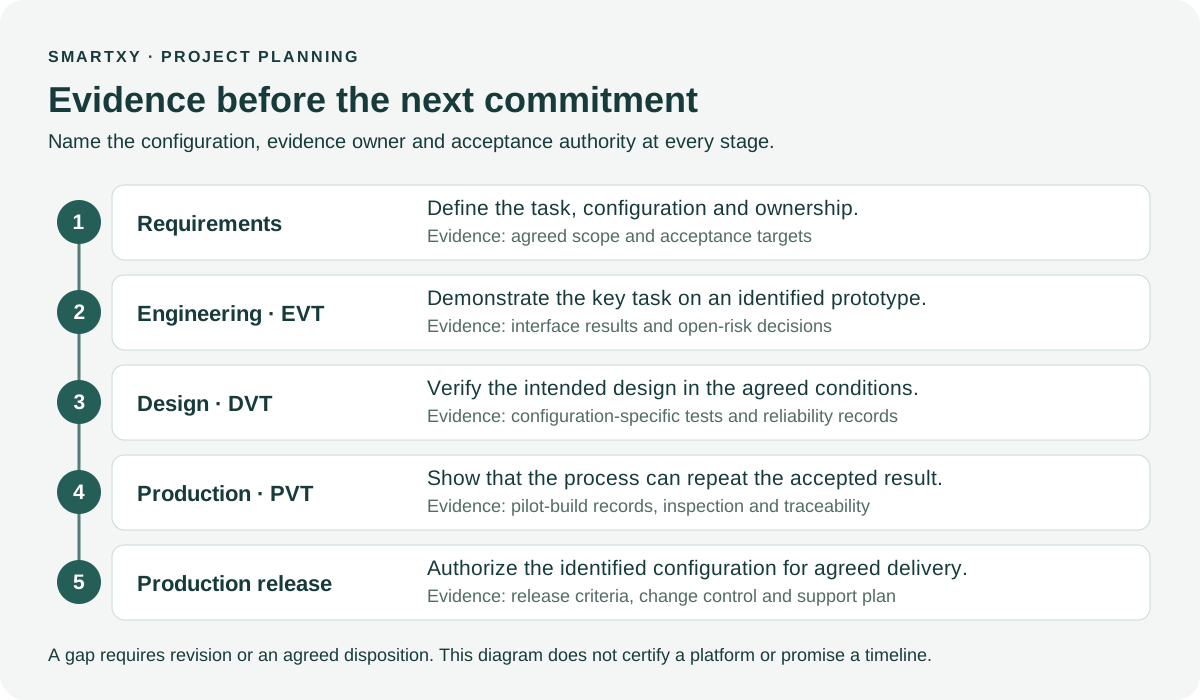
Agree the evidence needed for your own next decision with the configuration owner. Use the ODM validation framework to separate a proposed test, a completed run, defect closure and accepted release. If the source lacks a necessary condition, report the gap instead of estimating a more attractive number.
Questions buyers ask
Can I compare standby time with continuous recording time?
No. They describe different workloads. Compare results only after recording the task, device configuration, settings, network path and termination condition.
Has SmartXY performed new hardware tests for this article?
No new physical hardware, battery-runtime or thermal testing was performed for this article. Its record is a blank planning template, not a results table.
Does a heat-spreading material prove a temperature limit?
No. A design feature is not a measured limit or a guarantee. Request configuration-specific methods, observations and approved operating conditions.
What should I do when a published runtime lacks test conditions?
Request the missing workload and configuration information, record what remains unknown, and agree an evaluation relevant to your task. Do not infer an all-day or continuous-use promise.
Sources and scope
This is SmartXY's buyer-planning guidance. Platform statements refer to the linked public pages and their stated conditions; they are not independent test certification. Requirements, proposed tests and blank templates are not completed project evidence. Configuration-specific facts and current package availability must be confirmed for the project.
Define your next evaluation
Share the intended task, preferred platform and the decisions your team needs evidence to make. Product access, engineering work, pricing and delivery remain subject to the agreed configuration and commercial scope.